> ## Documentation Index
> Fetch the complete documentation index at: https://flutterwaveinc.mintlify.site/llms.txt
> Use this file to discover all available pages before exploring further.
# Authentication
> Learn about supported modes and how to connect to Flutterwave.
There are two **modes** of operation on your Flutterwave account:
1. **Test Mode**: This mode does not require the use of real money and designed exclusively for testing purposes. You can simulate data to replicate real-world scenarios using our [test cards and bank accounts](/testing) without any financial impact. It lets you test and validate your integration before going live.
2. **Live Mode**: This mode is the production environment where real money, real transactions, and real operations take place. It handles actual customer data and financial transactions. Only switch to this after you've tested your integrations thoroughly on test mode.
You can easily switch between Live and Test modes, by using the toggle button in the menu sidebar on your settings page. When you switch between modes, we'll also switch the API keys shown. Test keys will always have `_TEST` as prefix (for example, `FLWPUBK_TEST-32193bba8dab84e3d9c4525c85ea7a12-X`)
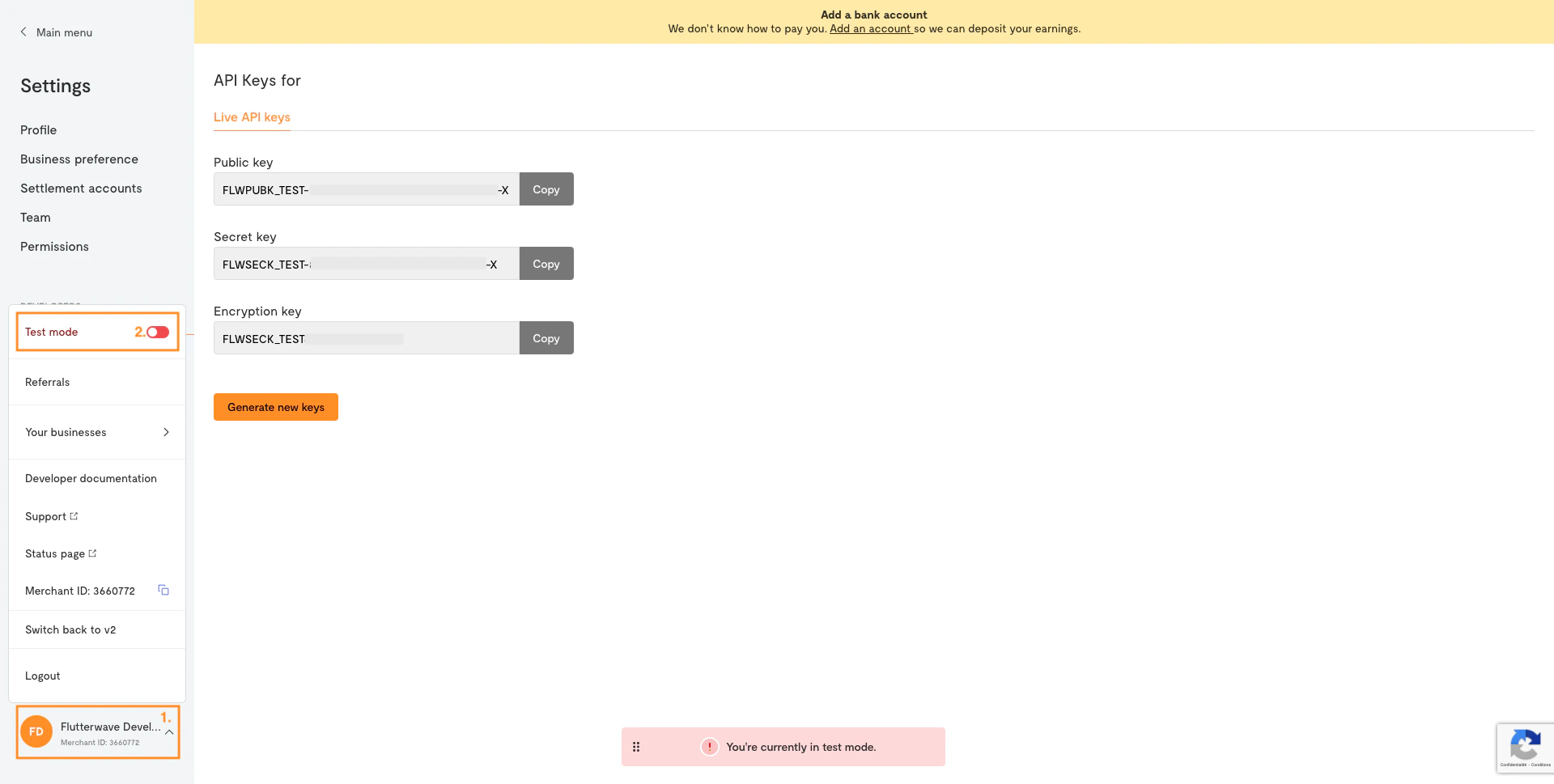 ## Get your API keys
When you create a Flutterwave account, you will be given three kinds of API keys:
1. **Secret key**: The most powerful type of key. It authorizes any action on your account, so it should never be exposed publicly.
2. **Public key**: The key you'll use in "public" scenarios, like in front-end JavaScript code (e.g. [Flutterwave Inline](/payments-embed/inline)).
3. **Encryption key**: Only used with the [direct card charge endpoints](/payment-api/card). See the [encryption guide](/encryption) for more details.
Your API keys are very vital to making requests successfully to our servers. To get your API keys for Test mode:
1. Log into your [Flutterwave account](https://app.flutterwave.com/login)
2. Go to your [dashboard](https://app.flutterwave.com/dashboard/home).
3. Navigate to **Settings**
4. Select the **API Keys** menu under the `DEVELOPERS` section and copy your keys.
## Get your API keys
When you create a Flutterwave account, you will be given three kinds of API keys:
1. **Secret key**: The most powerful type of key. It authorizes any action on your account, so it should never be exposed publicly.
2. **Public key**: The key you'll use in "public" scenarios, like in front-end JavaScript code (e.g. [Flutterwave Inline](/payments-embed/inline)).
3. **Encryption key**: Only used with the [direct card charge endpoints](/payment-api/card). See the [encryption guide](/encryption) for more details.
Your API keys are very vital to making requests successfully to our servers. To get your API keys for Test mode:
1. Log into your [Flutterwave account](https://app.flutterwave.com/login)
2. Go to your [dashboard](https://app.flutterwave.com/dashboard/home).
3. Navigate to **Settings**
4. Select the **API Keys** menu under the `DEVELOPERS` section and copy your keys.
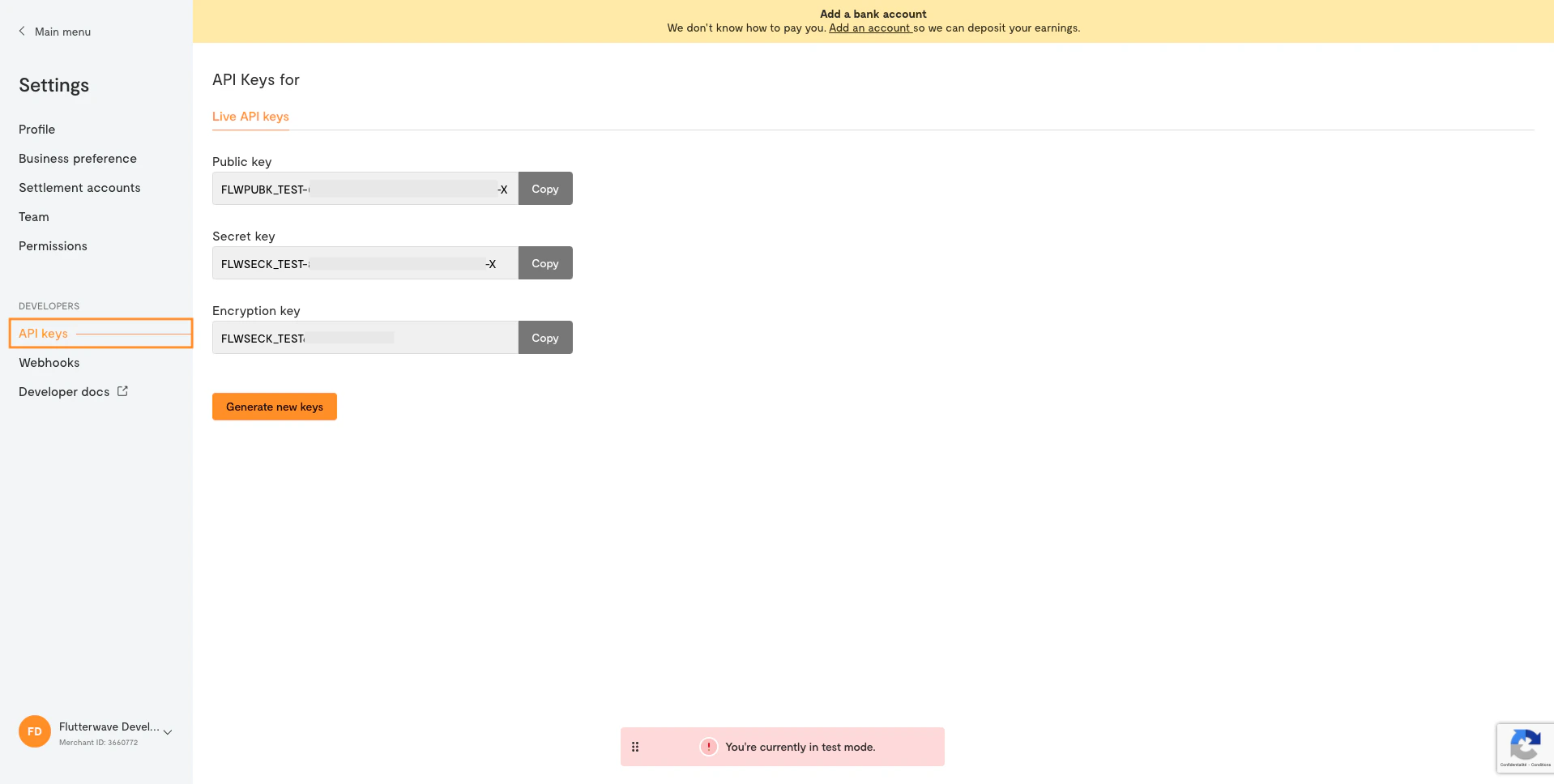 In the live environment, API key management is slightly different. To enhance the security of your live transactions, we mask the keys to prevent unauthorized access.
**Don't take any chances**
If you think your keys may have been compromised (for instance, you accidentally committed them to Git), you should immediately generate new ones using the **Generate new keys** button on the **Settings > API** page on your dashboard.
This will invalidate all existing keys and give you a new set, and you can then update your app to use the new ones.
## Authorizing API calls
All API calls on Flutterwave are protected by default. Any API requests made without proper authorization will result in the status code **401: Unauthorized**.
Your secret key can perform any actions on your Flutterwave account without restriction. It should be kept confidential and only stored on your servers, preferably as an environment variable.
It should **not** be included in your Git repository or front-end JavaScript code.
To authorize API calls from your server, pass your secret key as a bearer token. This means passing an Authorization header with a value of `Bearer: YOUR_SECRET_KEY`.
For example, an API call in Node.js would look like the following:
```json theme={null}
const response = await got.post("https://api.flutterwave.com/v3/payments", {
headers: {
Authorization: `Bearer ${process.env.FLW_SECRET_KEY}`
},
json: {
// Your payload
}
});
```
If you're using one of our [backend SDKs](sdk-plugins/backend-libraries/nodejs), you don't need to pass the header manually; instead, you'll provide your keys when initializing the library.
```python Python theme={null}
# Install with: pip install rave_python
import os
from rave_python import Rave
rave = Rave(os.getenv("FLW_PUBLIC_KEY"), os.getenv("FLW_SECRET_KEY"), os.getenv("FLW_ENCRYPTION_KEY"))
# Subsequqent calls will automatically have the header added
response = rave.Transfer.bvnResolve("123456789")
print(response)
```
```javascript Node.js theme={null}
// Install with: npm i flutterwave-node-v3
const Flutterwave = require('flutterwave-node-v3');
const flw = new Flutterwave(
process.env.FLW_PUBLIC_KEY,
process.env.FLW_SECRET_KEY
);
// Subsequqent calls will automatically have the header added
flw.Misc.bvn({ bvn: '123456789010' }).then((response) => console.log(response));
```
```ruby Ruby theme={null}
# Install with: gem install flutterwave_sdk
require 'flutterwave_sdk'
flw = Flutterwave.new(ENV["FLW_PUBLIC_KEY"], ENV["FLW_SECRET_KEY"], ENV["FLW_ENCRYPTION_KEY"])
# Subsequqent calls will automatically have the header added
misc = Misc.new(flw)
response = misc.resolve_bvn "123456789"
```
```php PHP theme={null}
// Install with: composer require flutterwavedev/flutterwave-v3
$flw = new \Flutterwave\Rave(getenv('FLW_SECRET_KEY'));
// Set `PUBLIC_KEY` as an environment variable
// Subsequent calls will automatically have the header added
$bvnService = new \Flutterwave\Bvn();
$response = $bvnService->verifyBVN("123456789");
```
```go Go theme={null}
// Install with: go get github.com/Flutterwave/Rave-go/rave
import (
"fmt"
"os"
"github.com/Flutterwave/Rave-go/rave"
)
var r = rave.Rave{
false,
os.Getenv("FLW_PUBLIC_KEY"),
os.Getenv("FLW_SECRET_KEY"),
}
// Subsequqent calls will automatically have the header added
var bvn = rave.BVN{
r,
}
err, response := bvn.Bvn("12345678901")
if err != nil {
panic(err)
}
fmt.Println(response)
```
In the live environment, API key management is slightly different. To enhance the security of your live transactions, we mask the keys to prevent unauthorized access.
**Don't take any chances**
If you think your keys may have been compromised (for instance, you accidentally committed them to Git), you should immediately generate new ones using the **Generate new keys** button on the **Settings > API** page on your dashboard.
This will invalidate all existing keys and give you a new set, and you can then update your app to use the new ones.
## Authorizing API calls
All API calls on Flutterwave are protected by default. Any API requests made without proper authorization will result in the status code **401: Unauthorized**.
Your secret key can perform any actions on your Flutterwave account without restriction. It should be kept confidential and only stored on your servers, preferably as an environment variable.
It should **not** be included in your Git repository or front-end JavaScript code.
To authorize API calls from your server, pass your secret key as a bearer token. This means passing an Authorization header with a value of `Bearer: YOUR_SECRET_KEY`.
For example, an API call in Node.js would look like the following:
```json theme={null}
const response = await got.post("https://api.flutterwave.com/v3/payments", {
headers: {
Authorization: `Bearer ${process.env.FLW_SECRET_KEY}`
},
json: {
// Your payload
}
});
```
If you're using one of our [backend SDKs](sdk-plugins/backend-libraries/nodejs), you don't need to pass the header manually; instead, you'll provide your keys when initializing the library.
```python Python theme={null}
# Install with: pip install rave_python
import os
from rave_python import Rave
rave = Rave(os.getenv("FLW_PUBLIC_KEY"), os.getenv("FLW_SECRET_KEY"), os.getenv("FLW_ENCRYPTION_KEY"))
# Subsequqent calls will automatically have the header added
response = rave.Transfer.bvnResolve("123456789")
print(response)
```
```javascript Node.js theme={null}
// Install with: npm i flutterwave-node-v3
const Flutterwave = require('flutterwave-node-v3');
const flw = new Flutterwave(
process.env.FLW_PUBLIC_KEY,
process.env.FLW_SECRET_KEY
);
// Subsequqent calls will automatically have the header added
flw.Misc.bvn({ bvn: '123456789010' }).then((response) => console.log(response));
```
```ruby Ruby theme={null}
# Install with: gem install flutterwave_sdk
require 'flutterwave_sdk'
flw = Flutterwave.new(ENV["FLW_PUBLIC_KEY"], ENV["FLW_SECRET_KEY"], ENV["FLW_ENCRYPTION_KEY"])
# Subsequqent calls will automatically have the header added
misc = Misc.new(flw)
response = misc.resolve_bvn "123456789"
```
```php PHP theme={null}
// Install with: composer require flutterwavedev/flutterwave-v3
$flw = new \Flutterwave\Rave(getenv('FLW_SECRET_KEY'));
// Set `PUBLIC_KEY` as an environment variable
// Subsequent calls will automatically have the header added
$bvnService = new \Flutterwave\Bvn();
$response = $bvnService->verifyBVN("123456789");
```
```go Go theme={null}
// Install with: go get github.com/Flutterwave/Rave-go/rave
import (
"fmt"
"os"
"github.com/Flutterwave/Rave-go/rave"
)
var r = rave.Rave{
false,
os.Getenv("FLW_PUBLIC_KEY"),
os.Getenv("FLW_SECRET_KEY"),
}
// Subsequqent calls will automatically have the header added
var bvn = rave.BVN{
r,
}
err, response := bvn.Bvn("12345678901")
if err != nil {
panic(err)
}
fmt.Println(response)
```