> ## Documentation Index
> Fetch the complete documentation index at: https://flutterwaveinc.mintlify.site/llms.txt
> Use this file to discover all available pages before exploring further.
# Webhooks
> Learn how to handle Flutterwave events on your webhook endpoint.
Webhooks are an important part of your payment integration. They allow Flutterwave to notify you about events that happen on your account, like a successful payment or a failed transaction.
A *webhook URL* is an endpoint on your server where you can receive notifications about such events. When an event occurs, we'll make a POST request to that endpoint, with a JSON body containing the details about the event, including the type of event and the data associated with it.
## When to Use Webhooks
Webhooks are supported for all kinds of payment methods, but they're especially useful for methods and events that happen outside your application's control, such as:
* Getting paid via mobile money or USSD
* A customer being charged for their subscription (recurring payments).
* A pending payment transitioning to successful.
These are all asynchronous actions, as your application does not control them, so you won't know when they are completed unless we notify you or you check later.
Setting up a webhook allows us to notify you when these payments are completed. Within your webhook endpoint, you can then:
* Update a customer's membership records in your database when a subscription payment succeeds.
* Email a customer when a subscription payment fails.
* Update your order records when the status of a pending payment is updated to successful.
## Structure of a Webhook Payload
All webhook payloads (*except virtual card debit*) follow the same basic structure:
* An `event` field describing the type of event.
* A `data` object. The content of this object will vary depending on the event, but typically, it will contain details of the event, including:
* an `id` containing the ID of the transaction.
* a `status` describing the status of the transaction.
* payment or customer details, if applicable.
Here are some sample webhook payloads for transfers and payments:
```json Successful Payment theme={null}
{
"event": "charge.completed",
"data": {
"id": 285959875,
"tx_ref": "Links-616626414629",
"flw_ref": "PeterEkene/FLW270177170",
"device_fingerprint": "a42937f4a73ce8bb8b8df14e63a2df31",
"amount": 100,
"currency": "NGN",
"charged_amount": 100,
"app_fee": 1.4,
"merchant_fee": 0,
"processor_response": "Approved by Financial Institution",
"auth_model": "PIN",
"ip": "197.210.64.96",
"narration": "CARD Transaction ",
"status": "successful",
"payment_type": "card",
"created_at": "2020-07-06T19:17:04.000Z",
"account_id": 17321,
"customer": {
"id": 215604089,
"name": "Yemi Desola",
"phone_number": null,
"email": "user@gmail.com",
"created_at": "2020-07-06T19:17:04.000Z"
},
"card": {
"first_6digits": "123456",
"last_4digits": "7889",
"issuer": "VERVE FIRST CITY MONUMENT BANK PLC",
"country": "NG",
"type": "VERVE",
"expiry": "02/23"
}
}
}
```
```json Failed Payment theme={null}
{
"event": "charge.completed",
"data": {
"id": 408136545,
"tx_ref": "Links-618617883594",
"flw_ref": "NETFLIX/SM31570678271",
"device_fingerprint": "7852b6c97d67edce50a5f1e540719e39",
"amount": 100000,
"currency": "NGN",
"charged_amount": 100000,
"app_fee": 1400,
"merchant_fee": 0,
"processor_response": "invalid token supplied",
"auth_model": "PIN",
"ip": "72.140.222.142",
"narration": "CARD Transaction ",
"status": "failed",
"payment_type": "card",
"created_at": "2021-04-16T14:52:37.000Z",
"account_id": 82913,
"customer": {
"id": 255128611,
"name": "a a",
"phone_number": null,
"email": "a@b.com",
"created_at": "2021-04-16T14:52:37.000Z"
},
"card": {
"first_6digits": "536613",
"last_4digits": "8816",
"issuer": "MASTERCARD ACCESS BANK PLC CREDIT",
"country": "NG",
"type": "MASTERCARD",
"expiry": "12/21"
}
},
"event.type": "CARD_TRANSACTION"
}
```
```json Successful Transfer theme={null}
{
"event": "transfer.completed",
"event.type": "Transfer",
"data": {
"id": 33286,
"account_number": "0690000033",
"bank_name": "ACCESS BANK NIGERIA",
"bank_code": "044",
"fullname": "Bale Gary",
"created_at": "2020-04-14T16:39:17.000Z",
"currency": "NGN",
"debit_currency": "NGN",
"amount": 30020,
"fee": 26.875,
"status": "SUCCESSFUL",
"reference": "a0a827b1eca65311_PMCKDU_5",
"meta": null,
"narration": "lolololo",
"approver": null,
"complete_message": "Successful",
"requires_approval": 0,
"is_approved": 1
}
}
```
```json Failed Transfer theme={null}
{
"event": "transfer.completed",
"event.type": "Transfer",
"data": {
"id": 2207648,
"account_number": "0731702***",
"bank_name": "ACCESS BANK NIGERIA",
"bank_code": "044",
"fullname": "Yemi Desola",
"created_at": "2020-07-06T21:49:02.000Z",
"currency": "NGN",
"debit_currency": "NGN",
"amount": 5000000000,
"fee": 53.75,
"status": "FAILED",
"reference": "ionn1594072140865",
"meta": null,
"narration": "ionnodo",
"approver": null,
"complete_message": "DISBURSE FAILED: You can only spend NGN 1000000.00 at once",
"requires_approval": 0,
"is_approved": 1
}
}
```
```json Virtual Card Debit theme={null}
{
"TransactionId": "9998d447-9159-4591-9661-aa7f1458d91b",
"MerchantName": "Flutterwave",
"Description": "CHARGE",
"Status": "Successful",
"Balance": 4.7925,
"Amount": 0.2075,
"Type": "Debit",
"CardId": "ccb40595-eaad-4a8f-bb9a-74ae245b12bb",
"MaskedPan": "428803******4329"
}
```
```json Virtual Card OTP theme={null}
{
"TransactionId": null,
"MerchantName": null,
"Description": "OTP",
"Status": "Pending Auth",
"Balance": 0,
"Amount": 0,
"Type": "Notification",
"CardId": "731a7d58-9293-4b50-b1f4-f2e0d56f3f4e",
"MaskedPan": "536898*******9526",
"Otp": "383290"
}
```
```json Cancelled Subscription theme={null}
{
"event": "subscription.cancelled",
"data": {
"status": "deactivated",
"currency": "NGN",
"amount": 200,
"customer": {
"email": "adeoyesamuel14@gmail.com",
"full_name": "Anonymous customer"
},
"plan": {
"id": 10944,
"name": "month",
"amount": 200,
"currency": "NGN",
"interval": "monthly",
"duration": 1,
"status": "cancel",
"date_created": "2021-04-19T10:52:06.000Z"
}
}
}
```
```json PSA Inflow theme={null}
{
"event": "transfer.completed",
"event.type": "Transfer",
"data": {
"id": 1771111,
"account_number": "83*****11",
"bank_name": "Community Federal Savings Bank",
"bank_code": "02***150",
"fullname": "PAYPAL;;US;PAYPALRD33;;091000019",
"created_at": "2021-12-13T14:36:02.000Z",
"currency": "USD",
"debit_currency": "PSA",
"amount": "100.10",
"fee": 0,
"status": "SUCCESSFUL",
"reference": "PSA_9e94ce41-39f5-460b-a0bb-111111111111",
"meta": null,
"narration": "WALLET FUNDING",
"approver": null,
"complete_message": "",
"requires_approval": 0,
"is_approved": 1
}
}
```
```json BVN Verification theme={null}
{
"event": "bvn.completed",
"event.type": "BVN",
"data": {
"id": 18,
"reference": "FLW441BD872AEBB28BD53B239",
"status": "COMPLETED",
"firstname": "LYRA",
"lastname": "Balacqua",
"callback_url": "https://webhook.site/939e641f-e477-4b1d-af3a-1ee9bbbd1181",
"AccountId": 35308,
"bvn_data": {
"additionalInfo1": null,
"branchName": null,
"dateOfBirth": "199x-05-xxT23:00:00Z",
"email": "test-user@example.com",
"enrollBankCode": null,
"enrollUserName": "user@example.com",
"enrollmentDate": null,
"faceImage": "/9j/4AAQSkZJRgABAgAAAQABAAD/2wBDAAgGBgcGBQgHBwcJCQgKDBQNDAsLDBkSEw8UHRofHh0aHBwgJC4nICIsIxwcKDcpLDAxNDQ0Hyc5PTgyPC4zNDL/2wBDAQkJCQwLDBgNDRgyIRwhMjIyMjIyMjIyMjIyMjIyMjIyMjIyMjIyMjIyMjIyMjIyMjIyMjIyMjIyMjIyMjIyMjL/wAARCAGQASwDASIAAhEBAxEB/8QAHwAAAQUBAQEBAQEAAAAAAAAAAAECAwQFBgcICQoL/8QAtRAAAgEDAwIEAwUFBAQAAAF9AQIDAAQRBRIhMUEGE1FhByJxFDKBkaEII0KxwRVS0fAkM2JyggkKFhcYGRolJicoKSo0NTY3ODk6Q0RF+vNcL27mkyTkZphY7gfEa/ZQGSPI6FeKt2vxIuldRNCki9z0IrzwLxnvT8kHrQFj2JPiBpRVd7EMRkgDOK0rbxdo9yo2XaKx/hY4rwwtgA5pwlK85+lILH0NDewz42ODkZ4NWQwNeEaZ4ivtOnSVJmfHBVj1FehaT45trt0SXMbsO/TNKwjteoo6gUyGRZEDqQQ3NSZoGLSHilo7UCAetIetLjijFAwpDSkelJz3oAPajOOKCBSUCF4pDx0pcGkIoGLkUnAoxg+1H4UCI6Wkpc0DClpuaWgApc0lFAC0UUlAWFozmk7UcUCDOBzVS81G3tI2aWRVwM81T1fxBZ6UhEr5f8AujHFeT+JPET6tdsV3LCvAGetFhmx4j8aPdO0Vm52Zxu9a4qWeSZizsSfeozJuJPemlqYIN2M0m4d6TPPSjYWGKAH76Qsp7UgiK9aXZQApIHIqNiWp+1jwBTxEcZoAh9yakDj/ChozjpUWCD3oAnVxng81NHIysCp5HNVfLJGQacrFTigD0Pw342a0Rba5BaPPDZ6V6NZ38V5GGjYYPvXz6rit/SPEk+mlQpLIOoJoCx7ePY5o5zWFoPiOy1S2ULLtmA+ZH4NbgOeQaQDqQ+9FHegQo6daOaMUUwEJOKO3FGPegECgAxz1oP50HHrSUAO7YxSYPrR+hq4bmdT4TW8ZSCS7toyOFbcR9K5Vj8xNbXiO483WpOeI1x+dYJPBPqamTvI46r1sPiOAxp0fKg1GuBExqWLlRimjAlA4p8Ms1rMJraZ4Zh0eM4P4+v40z8KKYJ2eh2Gl+Pbq3xHqVsLhf+esPysPqp4P4Gugj8Y6JKgf7aI8/wyqVI/CvMCeabyelNGyrS6o9gtdJsLJf9GtYoz6heT+PWppAAPeuXuPH1mmVtrO4mP8AefCL/U/pWHe+OdVmYiCO2gB/2S5/Xj9Kdze8V1O9Yjac1gan4i0vTyUkuVeUf8s4/mb9OlcFdatqV5n7Vf3EoP8ADu2r+S4FZzYA4AqXIXtEtjd1PxjeXOUs4xbR/wB8/M5/oK5iZ3mkaSV2kc9WY5NSNULDrUk8zZTkBLVEBh+PSp5cA1Dj5vekaosxcxMKz9uH/Gr8BxkVSYYc/Wktyobs3Ui3aS5H92ucToMV1Wlr52muh9K5Zl2Oy/3WIqnsaIUmm0oozxSKG8ilzRSEUABFGKSkoAXFFNzS7qBDsUoFMBpaAJBS7h2pgp3agYpOaQdaQdKXrQA4cmnqOaYBUi0gEbrXpXw7tmtfD91dvx50hIz6Dj+lecRQvcXKQRjLuwVfxr1m+C6N4chsozghAn6c1pDuZVHpY5HUZ/NnlkJ++xI+lVCPlANEzb5gKGOSKzXc4J6sG/1YX1NWIgQMVXfl0UDpzVlThaoXQdux1ppY/hTWIzSoAetUJIf2pc/Sm55IFJx9aZIqt7018ZpM4zTWbkUihj4qJj6U9utRMallojbpzUTVMelRMOaC0VZR14queGB96tSiqzjApG8SRDtf61HOm2QnsaeDwpp843xAjtS2Y4tpmp4clBd4j3rG1a3Ntqkydidw/GrOlTeRfLk4B4q74qtsNBdqMqw2k/yquhqtGc5RRmikWFFJS0ANNIRTjTTQAlKKSgUAKKcKSgUAPFL703tQaAFzSjrSCnDFADhT+gJpopwVpGWNAWdjhQO5oA6rwFpf27WTduuYrYZye7dq2fFGoedelAcqgx+Na1hZp4Y8LrG2BOy7m9Sxrh7yczzdcsx5qpOy5TkqyuNiPBkPelRgX9qHwkYUCmruVeFyT6Ckjl3JUG8l+Klzj6VGki/dzg04nimIOCRzUgOPpUajA7807OaBscD370m/HSmM4ApmSfWmybH/2Q==",
"firstName": "LYRA ",
"gender": "Male",
"landmarks": null,
"lgaOfCapture": null,
"lgaOfOrigin": "Test lga",
"lgaOfResidence": "Ikorodu",
"maritalStatus": "Single",
"middleName": "USER ",
"nameOnCard": null,
"nin": "485xxxxxx33",
"phoneNumber1": "234810xxxx188",
"phoneNumber2": null,
"productReference": "FLW441BD872AEBB28BD53B239",
"serialNo": null,
"stateOfCapture": "Lagos State",
"stateOfOrigin": "Lagos State",
"stateOfResidence": "Lagos State",
"surname": "Balacqua",
"watchlisted": "0.0"
},
"createdAt": "2023-04-13T23:02:23.000Z",
"updatedAt": "2023-04-13T23:06:18.000Z",
"deletedAt": null
}
}
```
```json Successful Bill Payment theme={null}
{
"event":"singlebillpayment.status",
"event.type":"SingleBillPayment",
"data":{
"customer":"+2347065657658",
"amount":200,
"network":"MTN",
"tx_ref":"CF-FLYAPI-20240604022555817834333",
"flw_ref":"BPUSSD17175111565077679855",
"batch_reference":null,
"customer_reference":"test-ref-kuf-01",
"status":"success",
"message":"Bill Payment was completed successfully",
"reference":null
}
}
```
## Enabling Webhooks
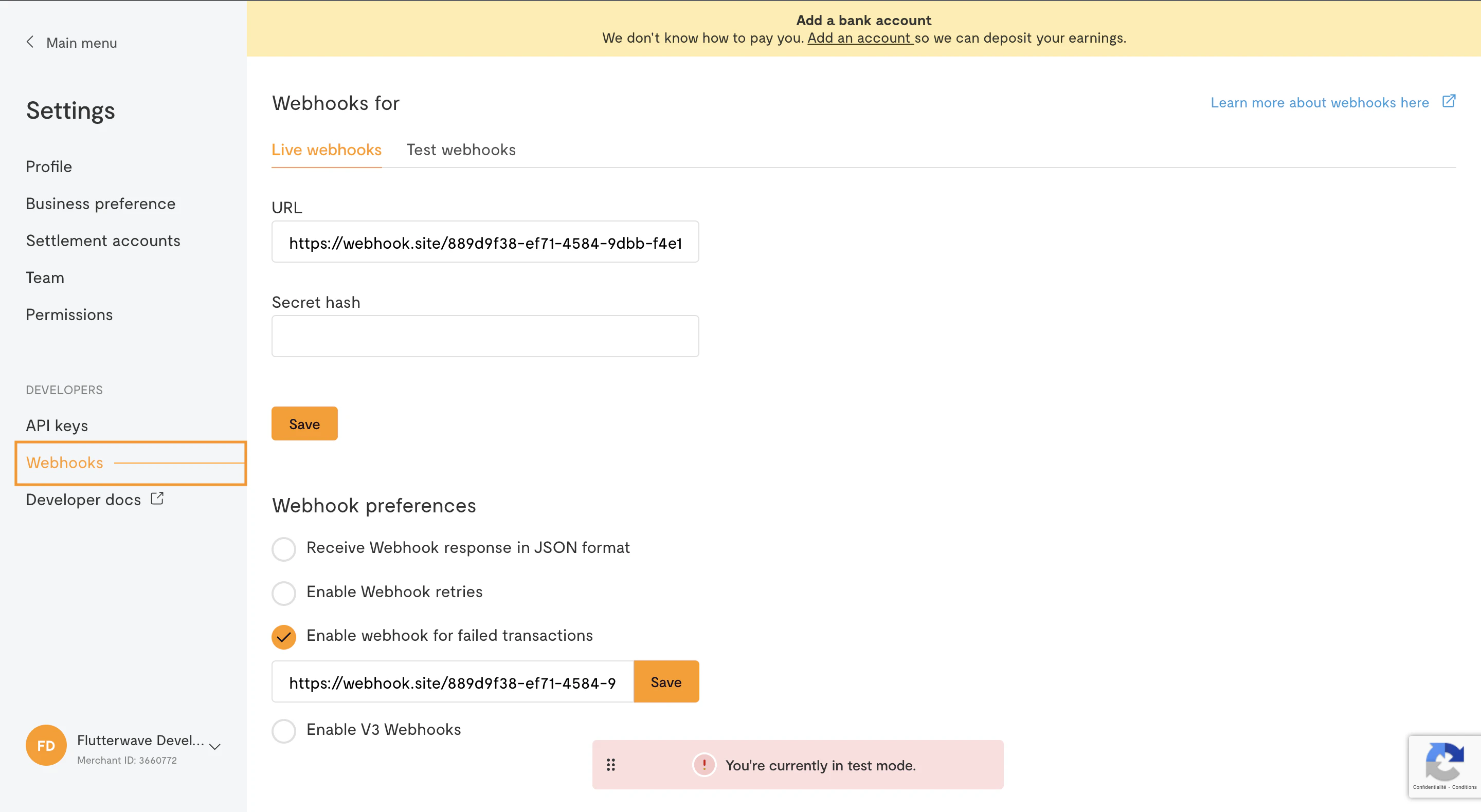
Here is how to set up a webhook on your Flutterwave account:
1. Log in to you [dashboard](https://dashboard.flutterwave.com/login) and click on **Settings**.
2. Navigate to **Webhooks** to add your webhook URL.
3. Check all the boxes and save your Settings.
 **Tip**
When testing, you can get an instant webhook URL by visiting [webhook.site](http://webhook.site/). This will allow you to inspect the received payload without having to write any code or set up a server.
## Implementing a Webhook
Creating a webhook endpoint on your server is the same as writing any other API endpoint, but there are a few important details to note:
### Verifying Webhook Signatures
When enabling webhooks, you have the option to set a *secret hash*. Since webhook URLs are publicly accessible, the secret hash allows you to verify that incoming requests are from Flutterwave. You can specify any value as your secret hash, but we recommend something random. You should also store it as an environment variable on your server.
If you specify a secret hash, we'll include it in our request to your webhook URL, in a header called `verif-hash`. In the webhook endpoint, check if the `verif-hash` header is present and that it matches the secret hash you set. If the header is missing, or the value doesn't match, you can discard the request, as it isn't from Flutterwave.
### Responding to Webhook Requests
To acknowledge receipt of a webhook, your endpoint **must** return a `200` HTTP status code. Any other response codes, including `3xx` codes, will be treated as a failure. **We don't care about the response body or headers**.
Be sure to enable webhook retries on your dashboard. If we don't get a `200` status code (for example, if your server is unreachable), we'll retry the webhook call **3 times**, with a **30-minute** interval between each attempt.
### Examples
Here are a few examples of implementing a webhook endpoint in some web frameworks:
Web frameworks like Rails or Django check POST requests for CSRF tokens, a security measure against cross-site request forgery. Exclude webhook endpoints from CSRF protection.
```javascript Node.js theme={null}
// In an Express-like app:
app.post("/flw-webhook", (req, res) => {
// If you specified a secret hash, check for the signature
const secretHash = process.env.FLW_SECRET_HASH;
const signature = req.headers["verif-hash"];
if (!signature || (signature !== secretHash)) {
// This request isn't from Flutterwave; discard
res.status(401).end();
}
const payload = req.body;
// It's a good idea to log all received events.
log(payload);
// Do something (that doesn't take too long) with the payload
res.status(200).end()
});
```
```php PHP theme={null}
// In a Laravel-like app:
Route::post('/flw-webhook', function (\Illuminate\Http\Request $request) {
// If you specified a secret hash, check for the signature
$secretHash = config('services.flutterwave.secret_hash');
$signature = $request->header('verif-hash');
if (!$signature || ($signature !== $secretHash)) {
// This request isn't from Flutterwave; discard
abort(401);
}
$payload = $request->all();
// It's a good idea to log all received events.
Log::info($payload);
// Do something (that doesn't take too long) with the payload
return response(200);
});
```
```python Python theme={null}
# In a Django-like app:
import os
@require_POST
@csrf_exempt
def webhook(request):
secret_hash = os.getenv("FLW_SECRET_HASH")
signature = request.headers.get("verifi-hash")
if signature == None or (signature != secret_hash):
# This request isn't from Flutterwave; discard
return HttpResponse(status=401)
payload = request.body
# It's a good idea to log all received events.
log(payload)
# Do something (that doesn't take too long) with the payload
return HttpResponse(status=200)
```
```ruby Ruby theme={null}
# In a Rails-like app:
class PaymentsController < ApplicationController
protect_from_forgery except: :webhook
def webhook
secret_hash = ENV["FLW_SECRET_HASH"]
signature = request.headers["HTTP_VERIFI_HASH"]
if !signature || (signature != secret_hash)
# This request isn't from Flutterwave; discard
head :unauthorized
return
end
payload = params
# It's a good idea to log all received events.
Log.info payload
# Do something (that doesn't take too long) with the payload
head :ok
end
end
```
## Best Practices
### Don't Rely Solely on Webhooks
Have a backup strategy in place in case your webhook endpoint fails. For instance, if your webhook endpoint is throwing server errors, you won't know about any new customer payments because webhook requests will fail.
To get around this, we recommend setting up a background job that polls for the status of any pending transactions at regular intervals (for instance, every hour) using the [transaction verification endpoint](transaction-verification) till a successful or failed response is returned.
### Use a Secret Hash
Remember, your webhook URL is public, and anyone can send a fake payload. We recommend [using a secret hash](/webhooks#verifying-webhook-signatures) so you can be sure the requests you get are from Flutterwave.
### Always Re-query
Whenever you receive a webhook notification, before giving the customer value, where possible, you should call our API again to verify the received details and ensure that the data returned has not been compromised.
For instance, when you receive a successful payment notification, you can use our [transaction verification endpoint](/api-reference/transactions/verify-a-transaction) to verify the status of the transaction before confirming the customer's order.
```javascript theme={null}
const payload = req.body;
const response = await flw.Transaction.verify({id: payload.id});
if (
response.data.status === "successful"
&& response.data.amount === expectedAmount
&& response.data.currency === expectedCurrency) {
// Success! Confirm the customer's payment
} else {
// Inform the customer their payment was unsuccessful
}
```
### Respond Quickly
Your webhook endpoint needs to respond within a certain time limit, or we'll consider it a failure and try again. Avoid doing long-running tasks or network calls in your webhook endpoint so you don't hit the timeout.
If your framework supports it, you can have your webhook endpoint immediately return a `200` status code, and then perform the rest of its duties; otherwise, you should dispatch any long-running tasks to a job queue and then respond.
### Be Idempotent
Occasionally, we might send the same webhook event more than once. You should make your event processing *idempotent* (calling the webhook multiple times will have the same effect), so you don't end up giving a customer value multiple times.
One way of doing this is recording the events you've processed and then checking if the status has changed before processing the duplicate event:
```javascript theme={null}
const payload = req.body;
const existingEvent = await PaymentEvent.where({id: payload.id}).find();
if (existingEvent.status === payload.status) {
// The status hasn't changed,
// so it's probably just a duplicate event
// and we can discard it
res.status(200).end();
}
// Record this event
await PaymentEvent.save(payload);
// Process event...
```
**Tip**
When testing, you can get an instant webhook URL by visiting [webhook.site](http://webhook.site/). This will allow you to inspect the received payload without having to write any code or set up a server.
## Implementing a Webhook
Creating a webhook endpoint on your server is the same as writing any other API endpoint, but there are a few important details to note:
### Verifying Webhook Signatures
When enabling webhooks, you have the option to set a *secret hash*. Since webhook URLs are publicly accessible, the secret hash allows you to verify that incoming requests are from Flutterwave. You can specify any value as your secret hash, but we recommend something random. You should also store it as an environment variable on your server.
If you specify a secret hash, we'll include it in our request to your webhook URL, in a header called `verif-hash`. In the webhook endpoint, check if the `verif-hash` header is present and that it matches the secret hash you set. If the header is missing, or the value doesn't match, you can discard the request, as it isn't from Flutterwave.
### Responding to Webhook Requests
To acknowledge receipt of a webhook, your endpoint **must** return a `200` HTTP status code. Any other response codes, including `3xx` codes, will be treated as a failure. **We don't care about the response body or headers**.
Be sure to enable webhook retries on your dashboard. If we don't get a `200` status code (for example, if your server is unreachable), we'll retry the webhook call **3 times**, with a **30-minute** interval between each attempt.
### Examples
Here are a few examples of implementing a webhook endpoint in some web frameworks:
Web frameworks like Rails or Django check POST requests for CSRF tokens, a security measure against cross-site request forgery. Exclude webhook endpoints from CSRF protection.
```javascript Node.js theme={null}
// In an Express-like app:
app.post("/flw-webhook", (req, res) => {
// If you specified a secret hash, check for the signature
const secretHash = process.env.FLW_SECRET_HASH;
const signature = req.headers["verif-hash"];
if (!signature || (signature !== secretHash)) {
// This request isn't from Flutterwave; discard
res.status(401).end();
}
const payload = req.body;
// It's a good idea to log all received events.
log(payload);
// Do something (that doesn't take too long) with the payload
res.status(200).end()
});
```
```php PHP theme={null}
// In a Laravel-like app:
Route::post('/flw-webhook', function (\Illuminate\Http\Request $request) {
// If you specified a secret hash, check for the signature
$secretHash = config('services.flutterwave.secret_hash');
$signature = $request->header('verif-hash');
if (!$signature || ($signature !== $secretHash)) {
// This request isn't from Flutterwave; discard
abort(401);
}
$payload = $request->all();
// It's a good idea to log all received events.
Log::info($payload);
// Do something (that doesn't take too long) with the payload
return response(200);
});
```
```python Python theme={null}
# In a Django-like app:
import os
@require_POST
@csrf_exempt
def webhook(request):
secret_hash = os.getenv("FLW_SECRET_HASH")
signature = request.headers.get("verifi-hash")
if signature == None or (signature != secret_hash):
# This request isn't from Flutterwave; discard
return HttpResponse(status=401)
payload = request.body
# It's a good idea to log all received events.
log(payload)
# Do something (that doesn't take too long) with the payload
return HttpResponse(status=200)
```
```ruby Ruby theme={null}
# In a Rails-like app:
class PaymentsController < ApplicationController
protect_from_forgery except: :webhook
def webhook
secret_hash = ENV["FLW_SECRET_HASH"]
signature = request.headers["HTTP_VERIFI_HASH"]
if !signature || (signature != secret_hash)
# This request isn't from Flutterwave; discard
head :unauthorized
return
end
payload = params
# It's a good idea to log all received events.
Log.info payload
# Do something (that doesn't take too long) with the payload
head :ok
end
end
```
## Best Practices
### Don't Rely Solely on Webhooks
Have a backup strategy in place in case your webhook endpoint fails. For instance, if your webhook endpoint is throwing server errors, you won't know about any new customer payments because webhook requests will fail.
To get around this, we recommend setting up a background job that polls for the status of any pending transactions at regular intervals (for instance, every hour) using the [transaction verification endpoint](transaction-verification) till a successful or failed response is returned.
### Use a Secret Hash
Remember, your webhook URL is public, and anyone can send a fake payload. We recommend [using a secret hash](/webhooks#verifying-webhook-signatures) so you can be sure the requests you get are from Flutterwave.
### Always Re-query
Whenever you receive a webhook notification, before giving the customer value, where possible, you should call our API again to verify the received details and ensure that the data returned has not been compromised.
For instance, when you receive a successful payment notification, you can use our [transaction verification endpoint](/api-reference/transactions/verify-a-transaction) to verify the status of the transaction before confirming the customer's order.
```javascript theme={null}
const payload = req.body;
const response = await flw.Transaction.verify({id: payload.id});
if (
response.data.status === "successful"
&& response.data.amount === expectedAmount
&& response.data.currency === expectedCurrency) {
// Success! Confirm the customer's payment
} else {
// Inform the customer their payment was unsuccessful
}
```
### Respond Quickly
Your webhook endpoint needs to respond within a certain time limit, or we'll consider it a failure and try again. Avoid doing long-running tasks or network calls in your webhook endpoint so you don't hit the timeout.
If your framework supports it, you can have your webhook endpoint immediately return a `200` status code, and then perform the rest of its duties; otherwise, you should dispatch any long-running tasks to a job queue and then respond.
### Be Idempotent
Occasionally, we might send the same webhook event more than once. You should make your event processing *idempotent* (calling the webhook multiple times will have the same effect), so you don't end up giving a customer value multiple times.
One way of doing this is recording the events you've processed and then checking if the status has changed before processing the duplicate event:
```javascript theme={null}
const payload = req.body;
const existingEvent = await PaymentEvent.where({id: payload.id}).find();
if (existingEvent.status === payload.status) {
// The status hasn't changed,
// so it's probably just a duplicate event
// and we can discard it
res.status(200).end();
}
// Record this event
await PaymentEvent.save(payload);
// Process event...
```