

NGN, USD, EUR, and GBP. This means that you can use the wallets to manage balances on behalf of your consumers for online transactions.
Some of the key features of these wallets include:
- Real-time wallet funding
- Support for transactions in NGN, USD, EUR, and GBP currencies
- Interoperability with withdrawals to bank accounts, mobile money, and other wallet systems.
Prerequisites
Before integrating, make sure that your account is live and that the feature is enabled.Note that some endpoints require approval before they can be used. If you
need access to these endpoints, please send an email to hi@flutterwavego.com
requesting approval.
Wallet Setup
The wallets are designed to hold four balances: NGN, USD, EUR, and GBP.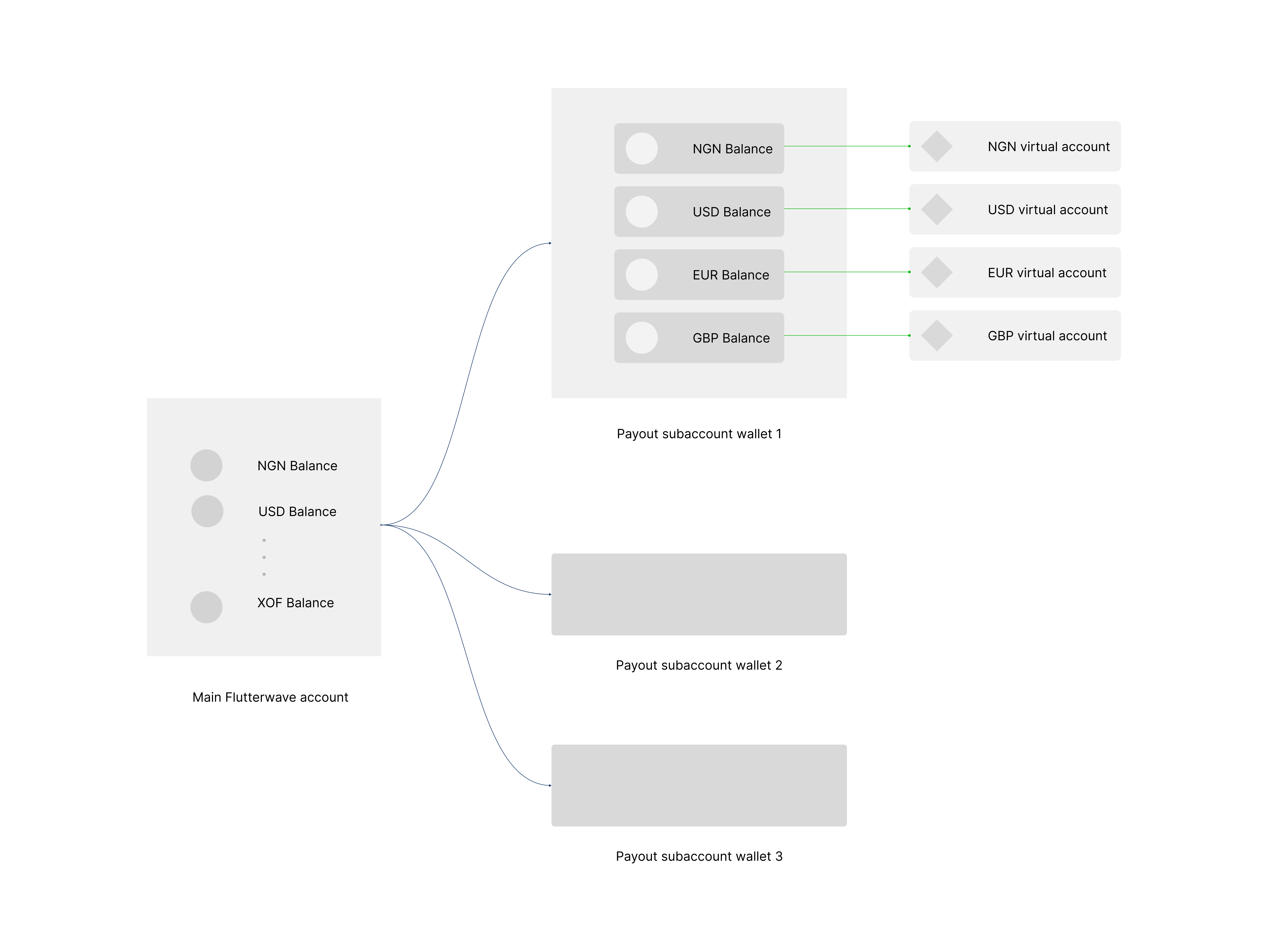
- Create a new wallet for your customer by providing their details eg
email_address. - Issue a virtual account for the wallet.
- Fund the wallet by making transfers to the virtual account.
- Manage the balances and customer details associated with the wallet.
Wallet Creation
To create a wallet for your customer, send the wallet name and the customer’s details (email address, mobile number, and country) to the wallet creation endpoint.By default, an NGN Wallet and Virtual Account will be created for you.
Sample Request
Successful Response
Issue Virtual Account
After creating your wallet, you will need to issue a virtual account that can be used to fund it. By default, an NGN virtual account is automatically created and linked to your wallet. To receive inflow into other wallet balances, you will need to issue a virtual account in the corresponding currency. For example, to receive USD inflow, you will need a USD virtual account.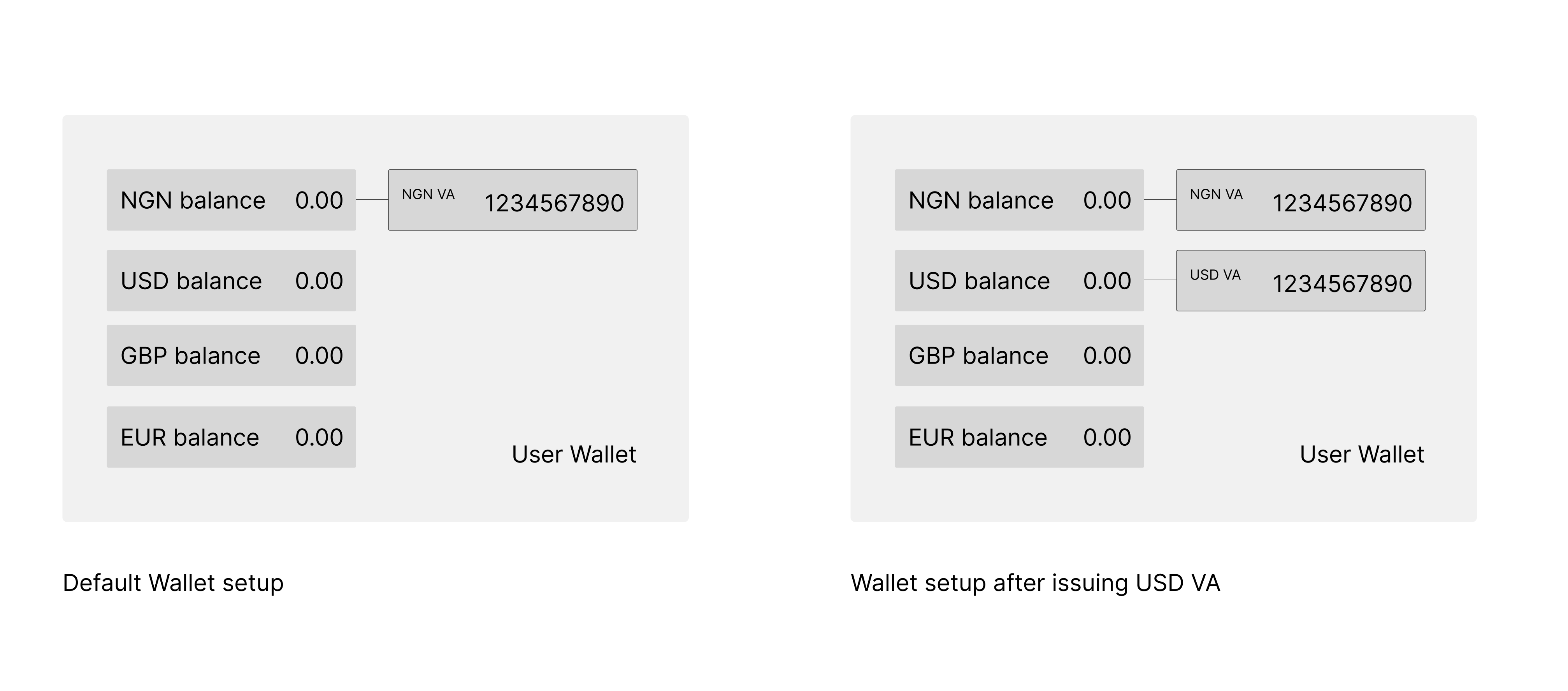
Successful Response
Sample Webhook
Wallet Funding
After creating your virtual accounts, you or end-users will need to transfer funds from your preferred bank to your wallet to fund it. Follow these guidelines to ensure successful funding of your wallets:- When the sending channel requires you to select an account type, choose “checking” (not savings).
- Please note that not all countries are permitted to send funds to virtual accounts. For a full list of permitted countries, please refer to the link.
- ACH payments are not supported for USD wallet funding.
Sample Request
200 OK
Sample Response
Mocking Wallet Funding
In test mode, you can simulate wallet funding. Follow the example below to mock your wallet funding:200 OK
Managing Wallets
Now that you have created a virtual account for your wallet, Your customers can now fund their wallets. You can manage your wallets with these operations:- Withdraw funds from a user’s wallet.
- Query a wallet’s balance.
- Fetch a wallet’s transactions.
- Update wallet details.
Making Wallet Withdrawals
Withdrawing funds from your wallet is easy. You need to provide the beneficiary details and transfer the amount to the create transfer endpoint. It is important to include thedebit_subaccount parameter. This will let us know which wallet to debit for the withdrawals. There are three destinations available for withdrawals:
- Bank Account Withdrawals: These withdrawals are made to the Customer’s Bank account.
- PSA Withdrawals: With this type of withdrawal, funds are transferred into another PSA account that you create.
- Withdrawals to F4B Account: This type of withdrawal is made into your main F4B account. To ensure a successful transaction, you’ll need to specify your F4B account.
Managing Wallet Details
If you need information on your wallets, you can use the fetch wallet to get the wallet’s data. With this endpoint, you can quickly and efficiently retrieve the paginated data. Even if you have a lot of wallets, you can easily filter the data using thecursor_pointer and limit parameters.
Fetch Wallet Details
Updating your User’s Wallet Details
If you ever need to update a user’s details, you can do so by passing the data to be added to the update endpoint. Please note that this endpoint only supports updates to the wallet name, mobile number, and email address.Sample Request