

When to Use Webhooks
Webhooks are supported for all kinds of payment methods, but they’re especially useful for methods and events that happen outside your application’s control, such as:- Getting paid via mobile money or USSD
- A customer being charged for their subscription (recurring payments).
- A pending payment transitioning to successful.
- Update a customer’s membership records in your database when a subscription payment succeeds.
- Email a customer when a subscription payment fails.
- Update your order records when the status of a pending payment is updated to successful.
Structure of a Webhook Payload
All webhook payloads (except virtual card debit) follow the same basic structure:- An
eventfield describing the type of event. - A
dataobject. The content of this object will vary depending on the event, but typically, it will contain details of the event, including:- an
idcontaining the ID of the transaction. - a
statusdescribing the status of the transaction. - payment or customer details, if applicable.
- an
Enabling Webhooks
Here is how to set up a webhook on your Flutterwave account:- Log in to you dashboard and click on Settings.
- Navigate to Webhooks to add your webhook URL.
- Check all the boxes and save your Settings.
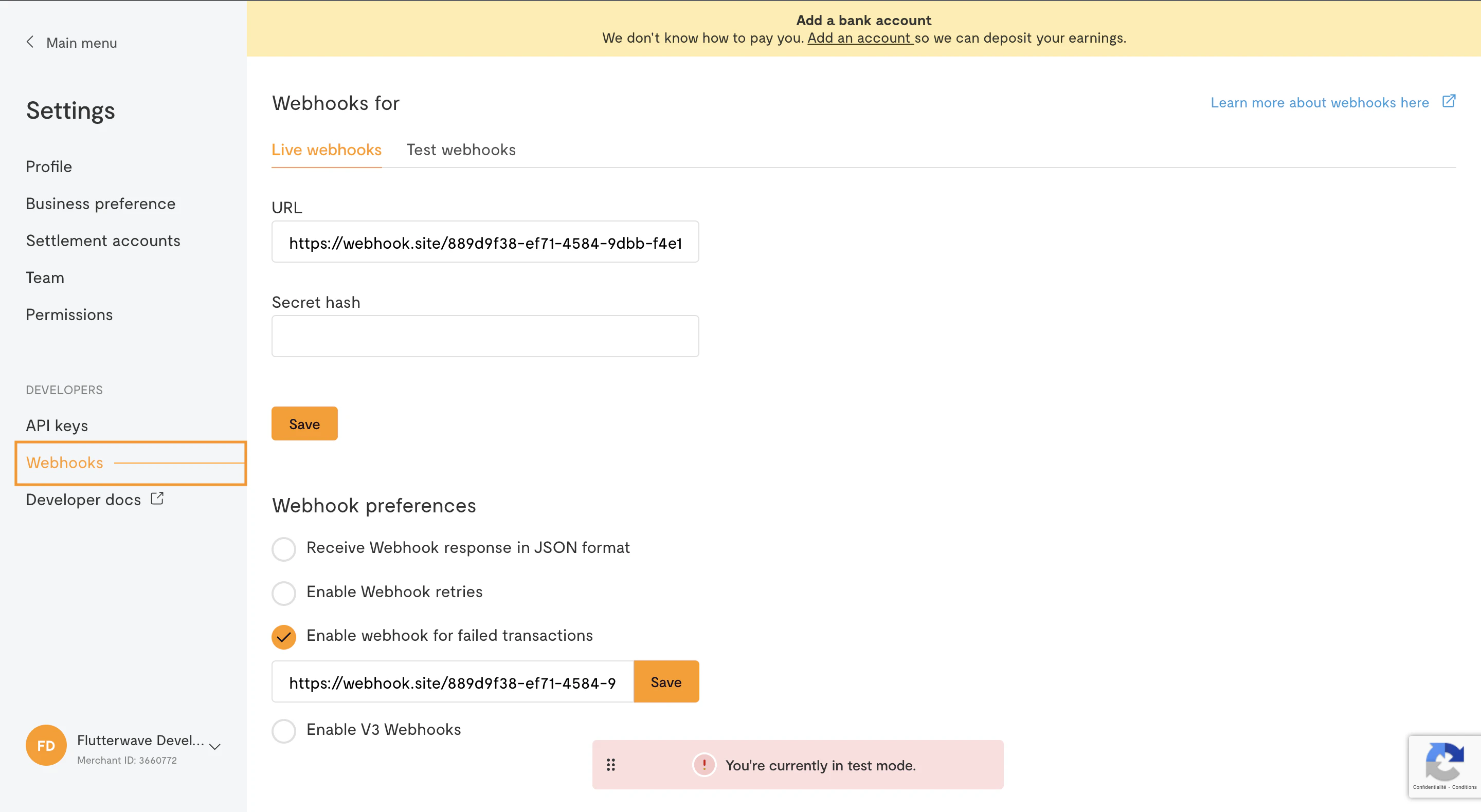
TipWhen testing, you can get an instant webhook URL by visiting webhook.site. This will allow you to inspect the received payload without having to write any code or set up a server.
Implementing a Webhook
Creating a webhook endpoint on your server is the same as writing any other API endpoint, but there are a few important details to note:Verifying Webhook Signatures
When enabling webhooks, you have the option to set a secret hash. Since webhook URLs are publicly accessible, the secret hash allows you to verify that incoming requests are from Flutterwave. You can specify any value as your secret hash, but we recommend something random. You should also store it as an environment variable on your server. If you specify a secret hash, we’ll include it in our request to your webhook URL, in a header calledverif-hash. In the webhook endpoint, check if the verif-hash header is present and that it matches the secret hash you set. If the header is missing, or the value doesn’t match, you can discard the request, as it isn’t from Flutterwave.
Responding to Webhook Requests
To acknowledge receipt of a webhook, your endpoint must return a200 HTTP status code. Any other response codes, including 3xx codes, will be treated as a failure. We don’t care about the response body or headers.
Be sure to enable webhook retries on your dashboard. If we don’t get a
200 status code (for example, if your server is unreachable), we’ll retry the webhook call 3 times, with a 30-minute interval between each attempt.Examples
Here are a few examples of implementing a webhook endpoint in some web frameworks:Best Practices
Don’t Rely Solely on Webhooks
Have a backup strategy in place in case your webhook endpoint fails. For instance, if your webhook endpoint is throwing server errors, you won’t know about any new customer payments because webhook requests will fail. To get around this, we recommend setting up a background job that polls for the status of any pending transactions at regular intervals (for instance, every hour) using the transaction verification endpoint till a successful or failed response is returned.Use a Secret Hash
Remember, your webhook URL is public, and anyone can send a fake payload. We recommend using a secret hash so you can be sure the requests you get are from Flutterwave.Always Re-query
Whenever you receive a webhook notification, before giving the customer value, where possible, you should call our API again to verify the received details and ensure that the data returned has not been compromised. For instance, when you receive a successful payment notification, you can use our transaction verification endpoint to verify the status of the transaction before confirming the customer’s order.Respond Quickly
Your webhook endpoint needs to respond within a certain time limit, or we’ll consider it a failure and try again. Avoid doing long-running tasks or network calls in your webhook endpoint so you don’t hit the timeout. If your framework supports it, you can have your webhook endpoint immediately return a200 status code, and then perform the rest of its duties; otherwise, you should dispatch any long-running tasks to a job queue and then respond.